How Trackr Works: Convert Mask to Motion & Transform in 3 Steps
Track mask→Apply keyframes→Done 🎉
(No After Effects needed)
Pr
Step 1: Mask Subject in Premiere
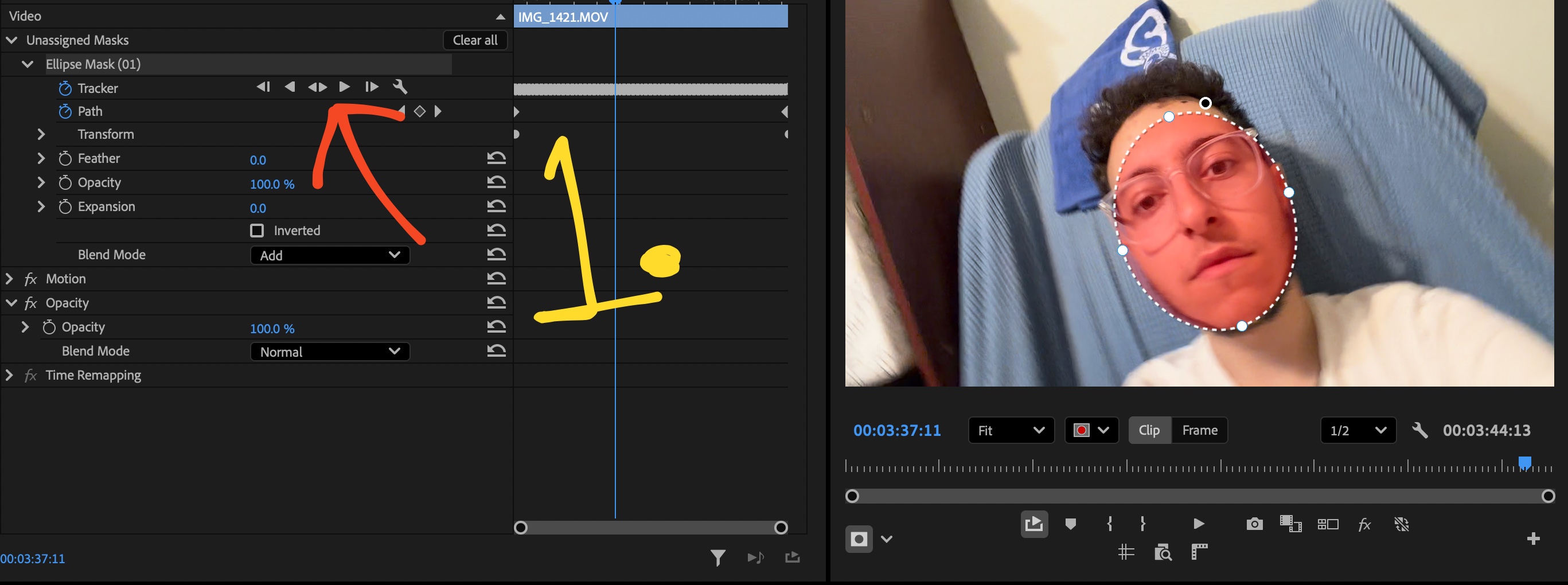
1MASK SUBJECT
Create Mask in Premiere
Draw a quick Opacity Mask over your subject in Premiere's Effect Controls panel and track forward.
2LOAD MASK
Trackr Reads & Caches
Click Load Mask in Trackr. Select/deselect transform properties. Click Track or Stabalize.
3APPLY KEYFRAMES
Paste to Text or Graphics
Select your text/graphics layer where you want to apply the tracking. After clicking Track or Stabalize you will see the keyframes populating. congrats!
Limited Pre-Launch Offer
Get Trackr Before Public Launch
Early Access. Exclusive Pricing. Lifetime rate increases to $79 at launch.
No Credit Card Required
Free Trial
Full access on your Premiere timeline.
$0/ 7 full days
●Direct Download in 5 Seconds
●Zero Payment Info or Card Ever Needed
●Unlimited Tracking & Transform Keyframes
Price Increases Soon
Lifetime License
51% Off Retail
Single payment. Own it forever.
$39$79One-Time
●Everything in Free Trial
●Pay once, own forever
●Continuous v1.x Updates Included
●48-Hour Money-Back Guarantee
Pay As You Go
Monthly Pass
Flexible pay-as-you-go. Cancel anytime.
$10/ month
●Everything in Free Trial
●Unlimited Tracking & Keyframes
●Cancel anytime
Compare Plans at a Glance
Feature
Free Trial
Monthly
Lifetime
Cost
$0
$10/mo
$39 once
Access
7 Days
Ongoing
Forever
Tracking Speed
Real-time
Real-time
Real-time
Credit Card
None
Required
Required
Updates
v1.x
All v1.x
All v1.x
Workflow Comparison
Stop Wasting Time in After Effects
200% Faster than After Effects Dynamic Link, eliminate roundtrip lag and stay on your timeline.
The Old Way: After Effects00:00 sec
After Effects (54s)
Slow Roundtrips & Freezing
Sending clips to After Effects interrupts your editing flow, consumes massive RAM, causes timeline playback stutter, and risks project link glitches.
The Fast Way: Trackr00:00 sec
Trackr Premiere (21s)
Fast Timeline Tracking
Track right inside Premiere Pro. No waiting for background apps to open, no heavy RAM previews, and no project link glitches.
Verified Customer Feedback
Customer Reviews
Real feedback from video editors switching away from After Effects roundtrips.
★★★★★
Customer Reviews Coming Soon
Real reviews from verified Premiere editors will appear here soon.
Launch Special:Price Increases Soon
Never Leave Premiere For a Simple Track Again
Join hundreds of video editors streamlining their timeline post-production workflow.
No credit card required
FAQ
Frequently Asked Questions
Trackr reads Adobe Premiere Pro opacity mask tracking data and writes sequence-accurate Position, Scale, and Rotation keyframes directly into the Transform effect of your selected text, graphic, or adjustment layer in 2 clicks. No need to switch software or manually keyframe.
Trackr integrates directly into Adobe Premiere Pro's timeline engine. By analyzing your selected tracking points directly on your sequence, Trackr generates precision Transform keyframes directly on your sequence, with no external software, no roundtripping, and no background rendering lag.
Because Trackr writes built-in Adobe Premiere Pro Transform effect keyframes, your sequence is 100% portable. You can send your project file (.prproj) to any client, colorist, or editor, and all keyframes will play back and render perfectly without any plugins installed.
No. 100% of image processing and tracking happens locally on your computer's CPU and GPU. Your client footage, project files, and assets never touch a cloud server or external API. Trackr works completely offline without an active internet connection.
Yes. Trackr is the updated and fully working alternative to Mask to Transform for Adobe Premiere Pro. While older extensions stopped working or broke with the latest Premiere Pro 2026 updates, Trackr is actively maintained and fully supported across current Premiere Pro releases. Trackr is faster, more accurate, and handles advanced features such as 2D surface tracking, screen replacements, text pinning, and graphics movement in one click with zero After Effects roundtripping.
Mask to Trackr is the core one click motion tracking workflow inside Trackr. Simply draw an opacity mask on any subject in Premiere Pro, let Premiere track it forward, and Trackr translates the mask path into sequence accurate Transform keyframes for your text, graphics, adjustment layers, or screen replacements.
Both plans give you the exact same full-featured Trackr extension with unlimited tracking. The Monthly Pass ($10/mo) is a flexible subscription you can cancel anytime. The Lifetime License ($39 one-time) is a single payment giving you permanent access with free updates for all v1.x releases.
We offer a 48-hour refund policy on all Lifetime License purchases. Subscriptions (Monthly Pass) are non-refundable, but can be cancelled anytime with zero penalty directly from your account.
Write a Customer Review
Share your experience with Trackr for Premiere Pro.
No Credit Card Required
Start Your Free Trial
Enter your details to generate your license key and download Trackr.
✓
Your 7-Day Free Trial is Active!
Copy your license key and download the extension to get started in Premiere Pro: