How Trackr Works: Convert Mask to Motion & Transform in 3 Steps
Track mask→Apply keyframes→Done 🎉
(No After Effects needed)
Pr
Step 1: Mask Subject in Premiere
1MASK SUBJECT
Create Mask in Premiere
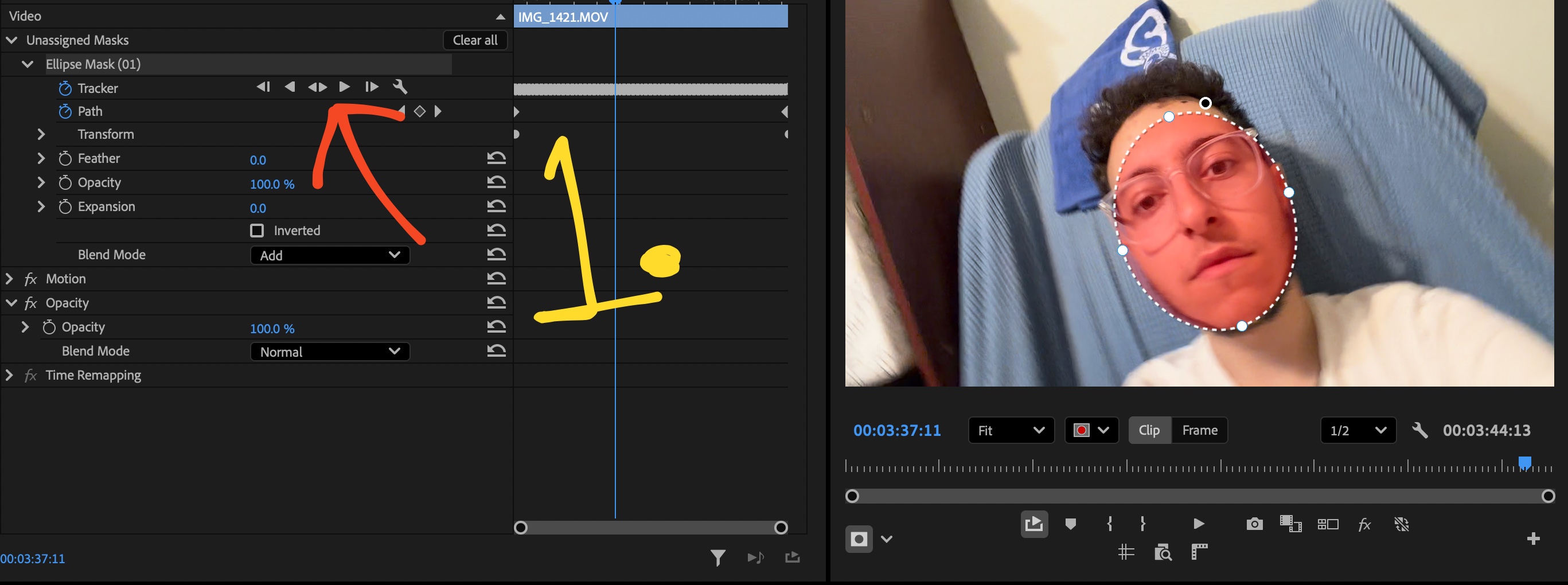
Draw a quick Opacity Mask over your subject in Premiere's Effect Controls panel and track forward.
2LOAD MASK
Trackr Reads & Caches
Click Load Mask in Trackr. Select/deselect transform properties. Click Track or Stabalize.
3APPLY KEYFRAMES
Paste to Text or Graphics
Select your text/graphics layer where you want to apply the tracking. After clicking Track or Stabalize you will see the keyframes populating. congrats!
Limited Pre-Launch Offer
Get Trackr Before Public Launch
Early Access. Exclusive Pricing. Lifetime rate increases to $79 at launch.
No Credit Card Required
Free Trial
Full access on your Premiere timeline.
$0/ 7 full days
●Zero Payment
●Instant Download
●Unlimited Tracking Keyframes
Price Increases Soon
Lifetime License
51% Off
Single payment. Own it forever.
$39$79One-Time
●Everything in Free Trial
●Pay once, own forever
●Continuous v1.x Updates Included
●Early Access to New Features
●Direct Support Included
Pay As You Go
Monthly Pass
Flexible. Cancel anytime.
$10/ month
●Everything in Free Trial
●Cancel anytime
Compare Plans at a Glance
Feature
Free Trial
Monthly
Lifetime
Cost
$0
$10/mo
$39 once
Access
7 Days
Ongoing
Forever
Tracking Speed
Real-time
Real-time
Real-time
Credit Card
None
Required
Required
Updates
v1.x
All v1.x
All v1.x
Workflow Comparison
Stop Wasting Time in After Effects
200% Faster than After Effects Dynamic Link, eliminate roundtrip lag and stay on your timeline.
The Old Way: After Effects00:00 sec
After Effects (54s)
Slow Roundtrips & Freezing
Sending clips to After Effects interrupts your editing flow, consumes massive RAM, causes timeline playback stutter, and risks project link glitches.
The Fast Way: Trackr00:00 sec
Trackr in Premiere (21s)
Fast Timeline Tracking
Track right inside Premiere Pro. No waiting for background apps to open, no heavy RAM previews, and no project link glitches.
Verified Customer Feedback
Customer Reviews
Real feedback from video editors switching away from After Effects roundtrips.
★★★★★
4.9 / 5•400+ Video Editors
Achacon Chaco★★★★★
Sep 18, 2026
"Man I've used it a couple of times and it's scarily precise hahaha. The best $39 I've invested! Tracking in Premiere saves A LOT of time."
Malice The Editor★★★★★
Sep 21, 2026
"Yeah gg this is sick! Tested it on a clip and it looks sick. Took a sec to figure everything out but I get it now and it's perfect. Working on a vid rn that needed this."
Nobita Edits★★★★★
Sep 17, 2026
"WAYY BETTER, WAYYY WAY BETTER! You did great, it is way better now, ggs."
Robert★★★★★
Sep 15, 2026
"Yeah! It's definitely a great tool, awesome work!"
Achacon Chaco★★★★★
Sep 18, 2026
"Man I've used it a couple of times and it's scarily precise hahaha. The best $39 I've invested! Tracking in Premiere saves A LOT of time."
Malice The Editor★★★★★
Sep 21, 2026
"Yeah gg this is sick! Tested it on a clip and it looks sick. Took a sec to figure everything out but I get it now and it's perfect. Working on a vid rn that needed this."
Nobita Edits★★★★★
Sep 17, 2026
"WAYY BETTER, WAYYY WAY BETTER! You did great, it is way better now, ggs."
Robert★★★★★
Sep 15, 2026
"Yeah! It's definitely a great tool, awesome work!"
Elite Eric★★★★★
Oct 8, 2026
"Biggest thing for me is it saves me having to make a dynamic link and open up AE for simple tracking or stabilizing shots. So pretty sweet to have that directly in Premiere!"
Sam Video Editor★★★★★
Sep 16, 2026
"Dude you haven't even realized that you've created something revolutionary for Premiere Pro editors. The spherize thing is soo fast and so good!"
Jari★★★★★
Sep 4, 2026
"Very good plugin man, will be using it for sure!"
Elite Eric★★★★★
Oct 8, 2026
"Biggest thing for me is it saves me having to make a dynamic link and open up AE for simple tracking or stabilizing shots. So pretty sweet to have that directly in Premiere!"
Sam Video Editor★★★★★
Sep 16, 2026
"Dude you haven't even realized that you've created something revolutionary for Premiere Pro editors. The spherize thing is soo fast and so good!"
Jari★★★★★
Sep 4, 2026
"Very good plugin man, will be using it for sure!"
TOOL USED BY EDITORS FOR
MrBeast500M+ subs
Stokes Twins100M+ subs
FaZe Rug30M+ subs
Matthew Beem8M+ subs
Launch Special:Price Increases Soon
Never Leave Premiere For a Simple Track Again
Join hundreds of video editors streamlining their timeline post-production workflow.
No credit card required
FAQ
Frequently Asked Questions
Trackr reads Adobe Premiere Pro opacity mask tracking data and writes sequence-accurate Position, Scale, and Rotation keyframes directly into the Transform effect of your selected text, graphic, or adjustment layer in 2 clicks. No need to switch software or manually keyframe.
Trackr integrates directly into Adobe Premiere Pro's timeline engine. By analyzing your selected tracking points directly on your sequence, Trackr generates precision Transform keyframes directly on your sequence, with no external software, no roundtripping, and no background rendering lag.
Because Trackr writes built-in Adobe Premiere Pro Transform effect keyframes, your sequence is 100% portable. You can send your project file (.prproj) to any client, colorist, or editor, and all keyframes will play back and render perfectly without any plugins installed.
No. Tracking runs locally. Your client footage, project files, and assets never touch a cloud server or external API. Trackr works completely offline without an active internet connection.
Yes. Trackr is the updated and fully working alternative to Mask to Transform for Adobe Premiere Pro. While older extensions stopped working or broke with the latest Premiere Pro 2026 updates, Trackr is actively maintained and fully supported across current Premiere Pro releases. Trackr is faster, more accurate, and handles advanced features such as 2D surface tracking, screen replacements, text pinning, and graphics movement in one click with zero After Effects roundtripping.
Mask to Trackr is the core one click motion tracking workflow inside Trackr. Simply draw an opacity mask on any subject in Premiere Pro, let Premiere track it forward, and Trackr translates the mask path into sequence accurate Transform keyframes for your text, graphics, adjustment layers, or screen replacements.
Both plans give you the exact same full-featured Trackr extension with unlimited tracking. The Monthly Pass ($10/mo) is a flexible subscription you can cancel anytime. The Lifetime License ($39 one-time) is a single payment giving you permanent access with free updates for all v1.x releases.
Trackr is designed, optimized, and officially supported exclusively for Adobe Premiere Pro 2026 on both macOS (Apple Silicon & Intel) and Windows 10/11. Compatibility with older versions (such as Premiere Pro 2025) is not officially supported or guaranteed; upon request, we can provide a build for Premiere Pro 2025 on a best-effort basis, but support is not guaranteed and we are not obligated to maintain legacy versions. We provide a 7-day free trial so you can test compatibility directly on your system before purchasing.
Due to the nature of Trackr being a digital product, all sales are final and non-refundable. Trackr requires Adobe Premiere Pro 2026. We provide a 7-day free trial with full feature access so you can test Trackr thoroughly with your Premiere Pro 2026 workflow before purchasing. Subscriptions (Monthly Pass) can be cancelled at any time directly from the Monthly Cancellation Portal.
No Credit Card Required
Start Your Free Trial
Enter your details to generate your license key and download Trackr.
✓
Check Your Email
We've sent your free license key directly to your inbox.
✉️
License Key Sent!
Your license key has been emailed to .
Please check your inbox and spam folder. Need help? Contact support@yojacq.com.